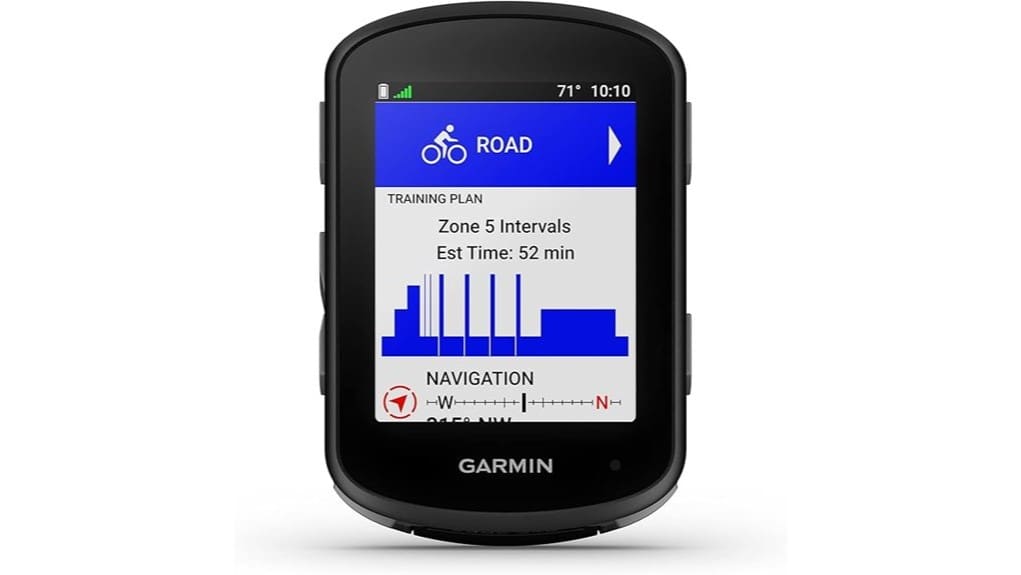
You’ll get a compact, rugged GPS bike computer that favors durability, predictable navigation, and long battery life for multi‑day rides. Controls work with gloves or wet hands, ergonomics reduce snag risk, and accessory support is broad. Multi‑band GNSS and cached maps keep fixes and routes reliable in trees and cities; ClimbPro and Power Guide aid pacing. Training metrics and sensor pairing are solid, with occasional drift and smoothing trade‑offs. Keep going to see detailed pros, cons, and alternatives.
Some Key Takeaways
- Durable, compact design with tactile buttons and low profile minimizes snagging and works well in wet or gloved conditions.
- Long battery life: about 26 hours standard, extendable to 42 hours with Battery Saver mode for multi-day rides.
- Multi-band GNSS delivers fast, precise satellite locks and reliable tracking under trees and in urban canyons.
- Robust navigation with fast-rendering ride maps, searchable cached POIs, ClimbPro ascent data, and dependable routing.
- Advanced training features include adaptive coaching, Power Guide, stamina tracking, and solid sensor pairing for accurate pacing.
Why the Edge 540 Matters: Compact Design, Battery Life, and Target Use Cases
The Edge 540 pares down a full-featured GPS cycling computer into a compact, button-controlled package that’s built for riders who prioritize durability and straightforward operation over touchscreen bells and whistles. You’ll notice compact ergonomics that let the unit sit low and unobtrusive on bars, reducing snag and aerodynamic penalty. Battery specifications—up to 26 hours standard, 42 in saver—translate to multi-day freedom without frequent charging. Controls stay tactile in wet or gloved conditions, and smart connectivity keeps data flowing. For riders who value daily reliability and minimal fuss, the Edge 540 balances endurance, resilience, and purposeful simplicity. Our store offers a range of essential accessories to complement bike computers and enhance the riding experience.
Navigation and Mapping in Practice: Multi-Band GNSS, Maps, POIs, and ClimbPro
Having covered why the Edge 540’s compact, button-driven design matters on long rides, let’s look at how its navigation stack performs in the real world. You’ll get multi-band GNSS that locks quickly and holds precision through tree cover and urban canyons; when signals falter, GNSS troubleshooting steps (reboot, antenna exposure, firmware) resolve most issues. Maps are ride-focused, fast to render, and searchable POIs feel immediate thanks to local POI caching. ClimbPro works every ride, showing remaining ascent and grade without a course. Overall, navigation is robust, predictable, and designed to keep you free to explore. Many cyclists pair the Edge 540 with ride-focused accessories to optimize on-bike navigation and data capture.
Training and Coaching Features Tested: Adaptive Coaching, Power Guide, Stamina, and Prompts
When you pair the Edge 540 with compatible power and heart-rate sensors, its adaptive coaching and Power Guide deliver actionable, ride-by-ride targets that adjust to your current training load and recovery status. You get adaptive prompts on-device for intervals, tempo changes and missed workouts, keeping sessions focused without micromanagement. Power Guide maps target watts across a route, letting you ride freely while respecting limits. Stamina tracking provides real-time depletion and recovery estimates so you can choose when to push or conserve. Overall the system is precise, unobtrusive and practical—designed for riders who want control without constraint. Boost your ride with smart cycling performance gear that complements the Edge 540 and enhances training consistency.
Performance, Sensors, and Course-Matching: Accuracy With Power Meters/Hrms and Course-Specific Insights
Building on the adaptive coaching and Power Guide data, you can see how the Edge 540 synthesizes sensor inputs and course analytics to produce actionable, course-specific performance insights. You’ll get reliable pacing when paired with quality power meters and HRMs, though sensor drift appears over long rides and benefits from occasional recalibration. Data smoothing balances responsiveness against noise; aggressive smoothing masks watt variability, conservative smoothing reveals spikes. Multi-band GNSS reduces satellite latency and improves segment matching on complex routes. Course-matching highlights where your strengths mismatch demands, letting you plan efforts without sacrificing the freedom to ride how you choose. The Edge 540 is especially useful for riders who want to maximize performance using power meters and cycling-specific tools.
Final Verdict and Buying Advice: Who Should Buy, Alternatives, and Value for Money
If you demand precise navigation, rich performance analytics, and long battery life in a compact, button-controlled package, the Edge 540 delivers a strong, well-balanced proposition. You’ll get multi-band GNSS accuracy, ClimbPro guidance, and actionable coaching when paired with compatible sensors. Firmware updates arrive regularly, improving maps and features; check Garmin’s cadence for major releases. Buy it if you want durable, standalone performance with broad accessory compatibility and minimal fuss. Consider the Edge 840 or Wahoo Elemnt Bolt for touchscreen or ecosystem preference. Overall value: high for focused riders who prioritize accuracy, autonomy, and reliable data. This model is well suited for riders who favor a straightforward, budget-friendly basic cycling computer experience.
Some Questions Answered
Does the Edge 540 Support Turn-By-Turn Alerts From Third-Party Apps?
Yes — the Edge 540 can receive third party notifications and will display turn-by-turn alerts when those apps push compatible routing cues. You’ll need route compatibility between the app and the device (supported protocols like Garmin or standardized GPX/TCX with routing cues). Third-party apps that properly send notifications and navigation prompts will trigger on-screen alerts. You’re free to mix apps, but verify pairing and route format for reliable alerts.
Can I Customize Button Functions and Data Screen Layouts?
Yes — you can. You’ll use button mapping to reassign physical controls and choose Screen templates to alter data layouts. The Edge lets you map buttons for quick functions (lap, back, start/stop) and select or edit screen templates to show preferred metrics. It’s technical, efficient, and liberating: you’ll tailor controls and displays to match training devices and riding style, improving workflow without sacrificing accuracy or battery life.
Is Wireless Firmware Updating Available Without a Phone?
No — you can’t perform wireless updates solely on the device; the unit relies on a phone or computer to deliver wireless updates. The Edge 540 supports wireless updates and OTA capability when paired with Garmin Connect Mobile on your phone or via Garmin Express on a PC/Mac. You’ll get OTA capability for firmware, maps, and features, but you’ll need that paired device to initiate and manage those wireless updates.
What Mount Types and Accessories Are Compatible?
You can use standard quarter turn mount ecosystems: the Edge 540 fits Garmin’s quarter turn mount and common out front mount designs. You’ll also pair it with an out front adapter or aero mount for aerodynamic positioning. Third‑party out front mounts and aero mounts that accept Garmin quarter turn tabs work, but verify fit and torque specs. You’re free to choose lightweight or long‑reach adapters to prioritize cockpit clearance and riding freedom.
Does It Store and Replay Heart-Rate/Power Data After Rides?
Yes — you can. You’ll get heart rate playback and power playback stored on-device and synced to Garmin Connect after rides, letting you review metrics over time. The device records paired HR and power sensors, preserves timestamps, and enables post-ride analysis including stamina and Power Guide comparisons. If you want freedom to dissect efforts, you’ll export or inspect session files in Garmin Connect for detailed, ride-by-ride performance replay and guidance.