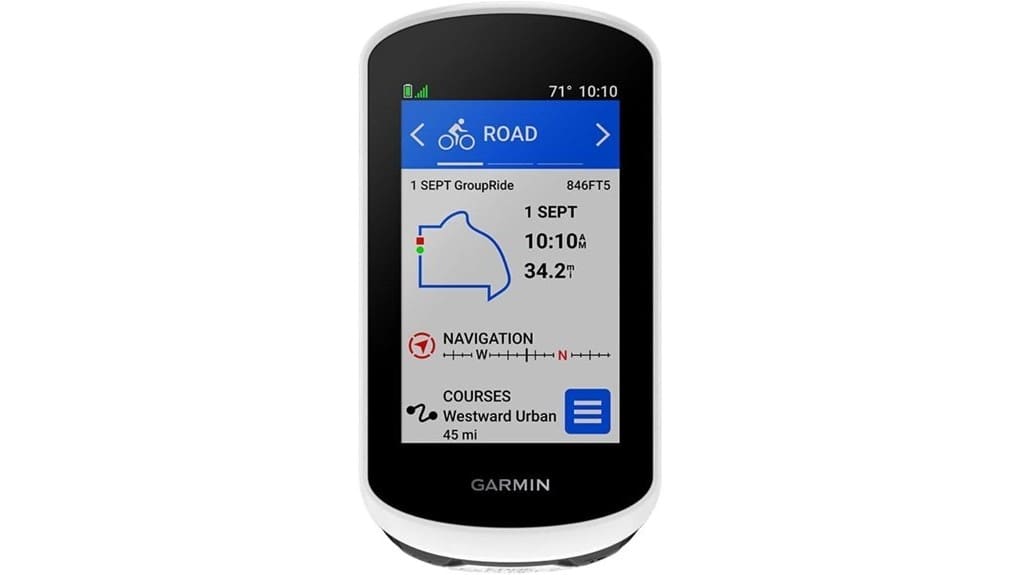
You’ll find the Garmin Edge Explore 2 gives you straightforward, glove-friendly navigation with bright 3″ touch controls, clear turn-by-turn prompts, and eBike-aware routing that warns when assist range gets tight. It handles road, gravel, and singletrack well, reconnects smoothly after signal loss, and pairs fast with your phone, Varia radar, and sensors for LiveTrack and incident alerts. It’s ideal if you want simple maps and practical safety features—keep going to see how it stacks up against other options.
Some Key Takeaways
- Bright 3″ glove-friendly touchscreen offers intuitive, quick-start navigation with minimal learning curve.
- Clear ride-type maps and responsive routing provide confident turn-by-turn directions for road, gravel, and trails.
- eBike-aware routing, assist-range alerts, and incident detection add practical on-ride safety and peace of mind.
- Reliable smartphone pairing, sensor support, Varia compatibility, and LiveTrack enhance connectivity and situational awareness.
- Battery life and simple interface suit commuters, weekend riders, and touring cyclists who want straightforward navigation.
Verdict Up Front: Is the Garmin Edge Explore 2 Worth It for Everyday Cyclists?
While the Edge Explore 2 isn’t the top-tier Garmin for racers, it gives you the most useful navigation, safety, and connectivity features everyday cyclists actually use—without a steep learning curve. You’ll appreciate the bright 3″ touchscreen, simple setup, and glove-friendly controls that get you rolling fast. Compared with pricier units, it balances route accuracy, eBike alerts, and incident detection for real-world freedom on rides. Battery lifespan meets typical weekend-and-commute use, and daily convenience shows in smartphone pairing, sensor support, and Varia compatibility. If you want reliable navigation and safety without complexity, this is a smart, rider-focused choice. It’s a good match for riders shopping for the best GPS for their bike rides and those who want straightforward, dependable performance with bike GPS essentials.
Real-World Navigation: Performance on Road, Off-Road, and Indoor Rides
Because the Edge Explore 2 combines clear, ride-type maps with responsive routing, you’ll find it dependable whether you’re sticking to pavement, exploring gravel, or riding indoors. You get crisp turn by turn prompts on road rides that keep you flowing and confident. Off-road, trail finding is reliable—maps highlight popular lines and you can reroute when singletrack pops up. Indoors it pairs with your phone and indoor ergometer, logging effort and letting you focus on training. Signal loss is rare; when it happens the device re-syncs routes smoothly. Overall, it favors freedom with predictable, no-fuss navigation. For riders looking to accessorize their setup, consider essential bike computer accessories to enhance mounting, protection, and connectivity.
Maps, Routing, and eBike Features That Matter on the Ride
Although the Edge Explore 2 sticks to a straightforward interface, its maps and routing do a lot of heavy lifting for you on the ride: pick a road, gravel or indoor profile and the unit highlights best-fit routes and popular trails, offers eBike-aware routing that factors in assist range, and surfaces searchable POIs so you can plan stops without guessing. You’ll compare suggested lines, seeing trail popularity and traffic layers that steer you toward quieter options. eBike alerts warn when battery or assist range becomes tight, so you won’t get stranded. Overall, routing feels purposeful, freeing you to ride farther with confidence. For riders prioritizing visibility and safety, pairing this unit with a high-visibility cycling vest like those designed to stay visible can help ensure you’re seen on mixed roads and trails.
Connectivity, Sensors, and Safety: Smartphone, Varia, and Incident Detection in Practice
Good route suggestions and eBike-aware alerts set you up to ride confidently, but staying connected and monitored on the road is what keeps that confidence steady. You’ll find smartphone pairing fast and reliable for LiveTrack, notifications, and music control, letting you roam without leaving safety behind. Pair Varia lights and radar integration to get rear-approach alerts that actually change how you ride—more defensive at busy spots, relaxed on quiet lanes. Incident detection adds a fail-safe, sending your location if things go wrong. Compared to basic units, the Explore 2 blends practical connectivity with freedom-focused safety. Check out our selection of cycling watch accessories to enhance your setup and get the most from your rides.
Who Should Buy the Edge Explore 2 : Use Cases, Alternatives, and Final Buying Tips
If you ride mostly for exploration and want reliable navigation without the complexity of full-featured cycling computers, the Edge Explore 2 is a smart, straightforward pick — it gives you crisp maps, eBike-aware routing, and essential safety and connectivity features in a glove-friendly touchscreen package. You’ll love it if you prioritize freedom: easy setup, visible display, POI search, and incident detection keep rides simple. It fits commuters who want commuter features without bulk, and supports long distance touring with battery-aware eBike alerts and routable maps. Consider a higher-end Edge for advanced training metrics or a budget device for basic tracking. Boost your ride with cycling performance gear from a dedicated website.
Some Questions Answered
Does It Support Turn-By-Turn Voice Navigation With Earbuds?
Yes — you’ll get turn-by-turn voice prompts and earbud pairing for guidance. You can pair wireless earbuds via your phone’s Bluetooth and hear spoken directions, ride alerts and notifications without looking down. Compared to devices that only show arrows, this gives you hands-free freedom to stay focused on the road. It also works with incident alerts and rider messages, so you’ll rely on audio cues for navigation and safety while you ride.
Can I Upload Custom Maps or GPX Routes Manually?
Yes — you can manually upload GPX routes and custom basemaps to the device via USB or Garmin Connect/third‑party apps. You’ll get offline routing for imported GPX tracks, but full offline map rerouting depends on installed basemaps and device maps. You’ll appreciate the hands‑on control: drag, tweak and load routes, compare basemap detail, then ride freely without cell service knowing your offline routing and custom basemaps are ready.
Is There a Battery-Saving Mode for Multi-Day Rides?
Yes — you can extend runtime with a battery saver and by selecting a lower power profile. You’ll toggle power profiles to dim the screen, limit sensors and disable nonessential connectivity for multi-day rides. Compared to always-on navigation, this hands-on approach gives you freedom to trade features for hours of extra use. Test settings before long trips so you know which profile preserves range without sacrificing the navigation you rely on.
Does It Record Ride Data to Third-Party Apps Automatically?
Yes — you can have automatic syncing to third-party apps, though it depends on the app and phone pairing. You’ll set background uploads via the Garmin Connect app, which then forwards rides to services like Strava or TrainingPeaks automatically. You’ll appreciate the hands-on control: toggle which apps get data, compare immediate uploads versus manual exports, and keep your freedom to choose automatic syncing or stick with local files for privacy and flexibility.
What Is the Warranty and Repair Process for Water Damage?
You’re covered by Garmin’s limited warranty, but it has warranty limitations: water damage is often excluded unless caused by a manufacturing defect. You’ll need to contact Garmin support, submit proof of purchase and photos, and they’ll assess repair vs. replacement. Repair timeframe varies; expect several business days to a few weeks depending on parts and service load. You’ll want to compare authorized repair costs versus replacement for maximal freedom.