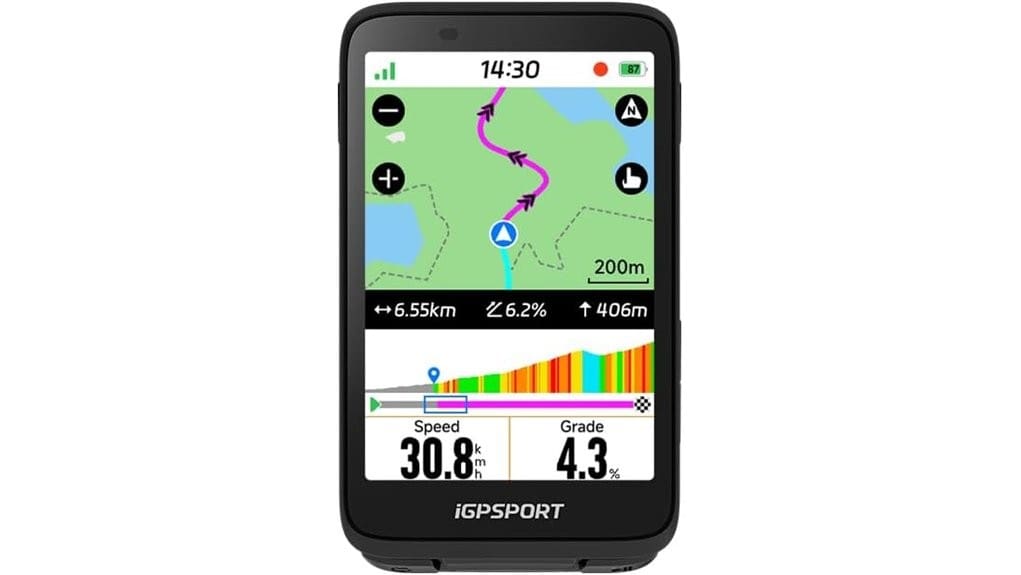
You’ll get a rugged, easy-to-use bike computer that makes navigation simple and reliable. It shows clear turn-by-turn Smart MAPs on a responsive 3.5″ touchscreen, accepts Strava/Komoot/GPX imports and roadbooks, and reroutes you when you stray. Physical buttons work with gloves, battery life covers day rides, and Bluetooth music controls and cloud sync keep things seamless. It’s ideal for commuters and gravel riders who want fuss-free guidance and continuity — keep going to see detailed pros, cons, and tips.
Some Key Takeaways
- Clear 3.5″ touchscreen and physical buttons deliver readable, responsive navigation and usable controls even with gloves and mixed lighting.
- Easy route import and wireless sync from Strava, Komoot, GPX, and roadbooks enables reliable turn-by-turn guidance and cloud backup.
- Smart MAP, automatic rerouting, saved-point navigation, and resume-last-ride handle spontaneous detours and course deviations well.
- Stable GNSS tracking, quick map loads, uncluttered on-screen data, and useful climb tips suit road, commuter, and gravel rides.
- Good battery life and rugged waterproof chassis make it durable for day rides and typical mixed-weather use.
Quick Verdict: Who the iGPSPORT Binavi Is Best For
If you ride often and rely on turn-by-turn maps, the iGPSPORT Binavi is a solid choice. You’ll appreciate its clear touchscreen and reliable GNSS tracking if you commute daily or chase backroads on weekends. It’s ideal for commuter cyclists who need dependable routing and hands-free controls to keep movement free and focused. Gravel adventurers will like the route import and saved-point planning that let you roam without fear of getting lost. You won’t get every pro-level telemetry feature, but you’ll gain straightforward navigation, music control, and resume-ride convenience that keep your rides liberating and low-fuss. Many riders also value having a device that integrates with popular cycling apps and supports route import.
Navigation and Map Features Tested: Smart MAP, Route Import, and Rerouting
Dive straight into the navigation and mapping, and you’ll find iGPSPORT’s Smart MAP and route tools practical and dependable for real-world riding. You import routes and perform Roadbook import from Strava, Komoot, or GPX files via the app, then sync wirelessly. The map stays readable and you’ll pan or zoom quickly to preview turns. If you drift, Smart rerouting kicks in, steering you back to the planned line without fuss. Saved Point Navigation and resume-last-ride make spontaneous detours and interruptions painless. Overall, routing feels liberating: reliable guidance that keeps you exploring without clipping your sense of freedom. Many riders pair the device with bike camera mounts to capture their adventures while navigating.
Hardware, Display, and Touch Interface: 3.5 Screen, Controls, and Durability
While riding, you’ll immediately notice the iGPSPORT’s 3.5″ touchscreen feels purpose-built for cycling: the display is bright and readable in mixed light, the touch response is fast enough for quick panning and menu taps, and the on-screen layout shows maps and essential ride data without clutter. The chassis is compact and rugged, with a solid waterproof rating that keeps it confident in rain and mud. Physical buttons supplement touch controls—button placement gives easy reach on the bars and tactile feedback when you need gloves. Battery life and mount stability let you roam without constant fiddling or worry. We also recommend checking our guide on bike computer accessories to optimize your setup.
Connectivity, Phone Integration, and Ride Continuity (Music, App Sync, Resume Ride)
Tap into the iGPSPORT’s connectivity and you’re set up for smooth phone integration and uninterrupted rides: the device pairs wirelessly with your smartphone for quick route transfers and data sync via the iGPSPORT app, lets you control music hands-free from the ride screen, and supports automatic resume of an interrupted session so your ride history stays intact. You’ll like reliable Bluetooth audio control for pausing or skipping tracks without fumbling your phone. App-driven cloud sync keeps routes and ride logs available across devices. Overall, connectivity is practical and freedom-focused — minimal fuss, quick reconnection, and seamless continuation. This simplicity makes it a good fit for cyclists who want a basic, easy-to-use cycling computer.
Real-World Performance, Battery Life, Pros/Cons, and Should-You-Buy Recommendation
Having covered connectivity and ride continuity, let’s look at how the Binavi performs on real rides: you’ll find GPS tracking is accurate for typical road and gravel use, the 3.5″ touchscreen stays responsive in varied light and temperature, and automatic rerouting plus resume-ride work reliably when you veer off course or need to stop. In the real world the unit feels rock-solid: maps load quickly, controls are intuitive, and climb tips actually help pacing. Battery longevity hits advertised claims for day rides but you’ll want a charger for multi-day tours. Pros cons are clear — capable, simple, limited advanced metrics. Buy recommendation: yes for freedom-seeking riders who value reliable navigation over pro-level data. The Binavi fits well into a site that helps cyclists navigate the best bike tech for every ride.
Some Questions Answered
Does It Support Cadence and Power Meter Pairing via Ant+/Bluetooth?
Yes — you can pair cadence sensors and power meters; the device supports ANT+ compatibility and Bluetooth pairing for sensors. You’ll get realtime cadence and power data during rides, and the unit will log and display those metrics on the 3.5″ touchscreen. You’ll appreciate reliable connections and flexible pairing options, letting you choose ANT+ or Bluetooth devices so you’re not locked into one ecosystem and can ride with freedom.
Can I Use It Offline Without the iGPSPORT App Installed?
Yes — you can use Offline functionality without the iGPSPORT app for basic navigation, saved point routing, and touch-screen map use, though some features like wireless route transfer and resume-ride syncing rely on the app. You’ll want App alternatives (manual GPX import via computer or SD card) to load detailed routes or road books. If you value freedom, plan routes outside the app and upload them directly so the device runs independently.
Is There Fall/Damage Insurance or Warranty Specifics Included?
No, the package typically doesn’t include explicit fall/damage insurance; you’ll get a manufacturer warranty instead. Check the warranty duration—most units offer a limited 1–2 year warranty covering defects, not accidental coverage for drops or crashes. You should consider buying separate accidental coverage or using your credit-card/household insurance. If you want freedom to ride worry-free, verify exact terms with the seller and document purchase for any claims.
Can Route Turn-By-Turn Cues Be Exported to Other Devices?
Yes — you can export turn-by-turn cues in common export formats and maintain third party compatibility. You’ll export routes from the app or device, then share files (often GPX/TCX) to other devices or services. That means you’re free to switch apps or hardware, reuse road books, and sync cues with third-party platforms. It’s practical, keeps your navigation flexible, and avoids locking you into one ecosystem.
Is Multilingual Map/Voice Navigation Available?
Yes — you’ll get multilingual map and voice prompts. You can install language packs via the iGPSPORT app and switch map labels or voice prompts to your preferred language, letting you ride freely without confusion. The touch screen and app make switching straightforward, and voice prompts keep your eyes on the road. If a needed language isn’t included, check for app updates or third-party route files that may add support.